If you are new to AI tooling, the words can get confusing quickly. People talk about agents, CrewAI, LangGraph, Codex skills, Claude skills, tools, workflows, and prompts as if they are all the same thing.
They are not.
The simplest distinction is this:
- An agent is for work where the system needs to decide what to do next.
- A project skill is for work where you already know the right way to do the task and want the AI assistant to follow it consistently.
That difference matters because many teams overbuild. They reach for an agent when a reusable checklist would work better. Other teams underbuild. They paste the same instructions into chat every day when those instructions should live as a project skill.
This guide gives you a practical way to choose.
What Is an Agent?
An AI agent is a system that can take a goal, use tools, inspect results, and decide the next step. In simple terms, an agent does not just answer once. It can loop.
For example, an agent might:
- Read an error report.
- Search logs.
- Inspect source code.
- Run a test.
- Decide whether the issue is a data problem, code problem, or environment problem.
- Produce a fix or escalate with evidence.
Agent frameworks such as CrewAI and LangGraph help developers build this kind of behavior.
CrewAI is oriented around autonomous agents, crews, tasks, and flows. That makes it useful when you want multiple role-based agents or a controlled workflow that delegates complex work to agents.
LangGraph is lower-level. It is useful when you need explicit control over long-running state, branching, persistence, human review, and recovery.
The common theme is autonomy. Agents are useful when the path is not fully known upfront.
What Is a Project Skill?
A project skill is different. A skill packages instructions, reference files, scripts, templates, or examples so an AI coding assistant can perform a known workflow reliably.
In Codex, skills are directories with a SKILL.md file and optional supporting folders such as scripts, references, and assets. The OpenAI Codex docs describe skills as a way to extend Codex with task-specific capabilities and reusable workflows.
Claude Code has a similar idea. Anthropic's docs describe skills as reusable instructions that Claude loads when relevant, instead of keeping every detail in the main context all the time. A skill can encode procedures that you would otherwise paste into chat repeatedly.
A project skill is not trying to be autonomous. It is trying to be consistent.
Examples:
- "When publishing a blog post in this repo, follow these exact folder, metadata, image, and PR rules."
- "When reviewing a pull request, check these files, run these commands, and format findings this way."
- "When creating a FastAPI endpoint, use this project structure, validation style, and test pattern."
The skill does not need to invent the process. It preserves the process.
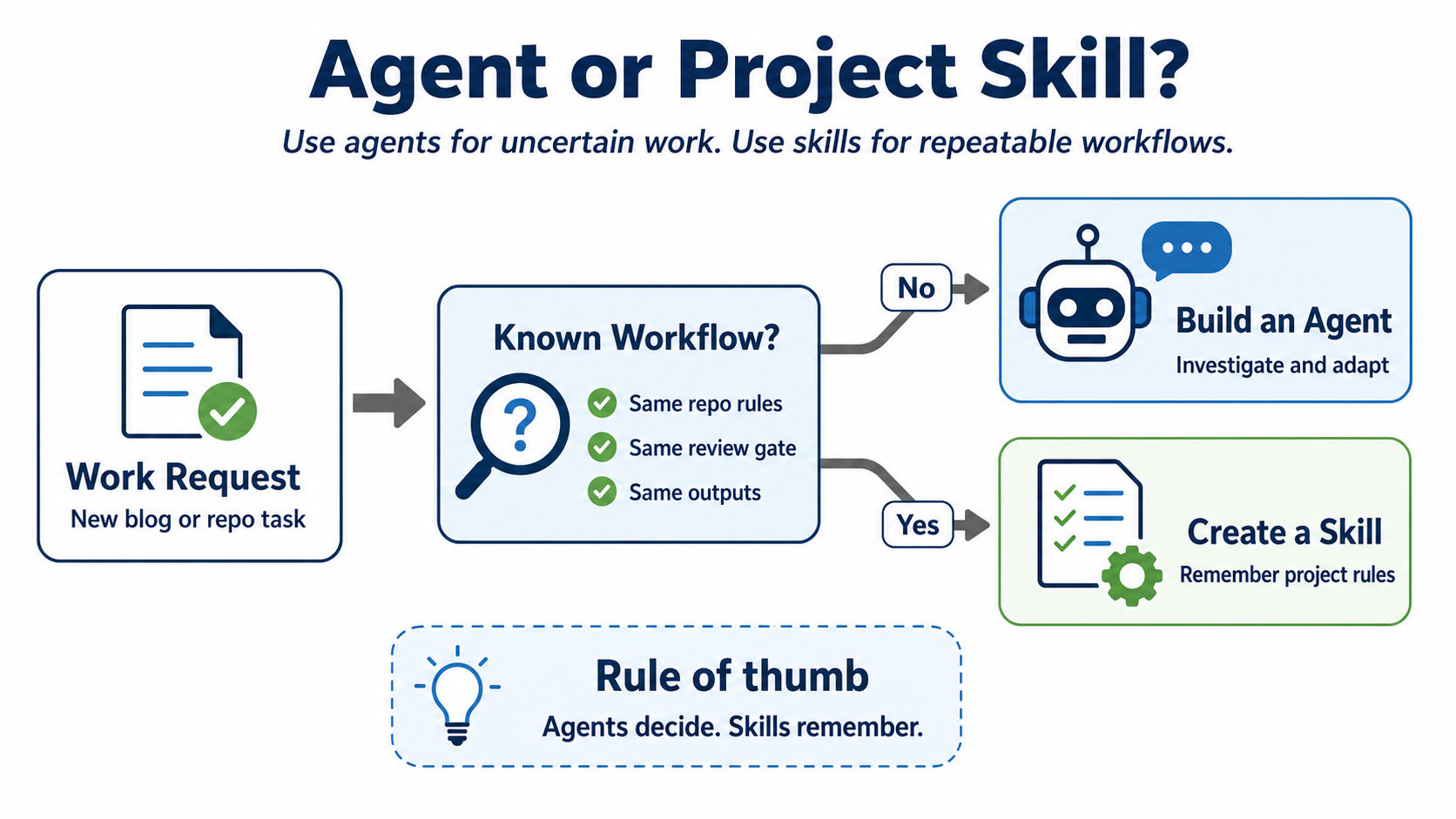
CrewAI and LangGraph vs Codex and Claude Skills
Here is the practical comparison.
| Question | Agent Frameworks: CrewAI / LangGraph | Project Skills: Codex / Claude |
|---|---|---|
| Main purpose | Build systems that decide and act | Teach an assistant a repeatable workflow |
| Best for | Open-ended tasks, research, triage, multi-step investigation | Known repo procedures, review checklists, templates |
| Control flow | Runtime logic, branching, loops, state | Instructions loaded when relevant |
| Tool use | Often central to the application | Optional helper scripts or local commands |
| State | Usually explicit and important | Usually light; repo and files are the state |
| Review risk | Higher, because agents may take different paths | Lower, because the desired path is documented |
| Example | "Investigate why this data pipeline failed overnight" | "Follow our standard dbt model creation workflow" |
Use an agent when you need runtime decision-making. Use a skill when you need repeatability.
When to Use an Agent
Use an agent when the task has uncertainty.
Good signs:
- The system needs to gather information from multiple places.
- The next step depends on what the system finds.
- The task may require retries, branching, or escalation.
- There is a long-running process that benefits from state.
- You want the system to call tools, inspect results, and adapt.
Example: support triage.
Imagine a customer says, "The API is slow for enterprise accounts in Europe." A useful agent might check monitoring dashboards, query logs, inspect recent deploys, compare regions, summarize likely causes, and open an incident draft. You do not know the exact path before the investigation starts. That is agent territory.
Example: research assistant.
If you ask, "Compare three orchestration frameworks for our use case," the system may need to search, evaluate tradeoffs, and iterate. A checklist helps, but the work still requires exploration.
When to Use a Skill
Use a project skill when the task is repeatable and project-specific.
Good signs:
- You already know the steps.
- The task happens often.
- The assistant keeps forgetting repo conventions.
- You want review gates, file naming rules, or command sequences followed exactly.
- The output should look the same every time.
Example: blog workflow.
In this repo, a blog post moves through spreadsheet statuses, YAML planning, Google Docs review, Markdown draft generation, diagram handling, final publishing, and PR creation. That is not a mystery. It is a process. A skill is the right abstraction because it records the exact workflow and prevents the assistant from skipping review gates.
Example: pull request review.
If your team expects findings first, file and line references, no praise filler, and a specific test summary, encode that as a skill. You do not need a new autonomous agent for every review. You need a reliable review procedure.
Example 1: Adding a Customer Preferences API
Suppose you are building a Python API with FastAPI.
Use a project skill when the request is predictable:
"Add a new endpoint for customer preferences using our existing route, schema, service, and test conventions."
The assistant should inspect nearby files, follow the repo's established pattern, add the endpoint, update tests, and run the right checks. A skill can define those steps:
- Where routes live.
- How request and response models are named.
- Which validation style the repo uses.
- Which test command to run.
- How to report the result.
The workflow is known.
Use an agent when the API work is investigative:
"Users report intermittent 500 errors on the preferences endpoint. Find the root cause."
Now the assistant may need to inspect logs, compare commits, run tests, check migrations, reproduce the error, and decide what to do next. The path is uncertain. An agent-like loop is useful.
The beginner mistake is to build a CrewAI or LangGraph agent for the first case. Save agent frameworks for the second case.
Example 2: Creating a Monthly Account Health Model
Now imagine a big data pipeline using Spark, Flink, or dbt.
Use a project skill when the task is a known convention:
"Create a new dbt model for monthly account health using our staging, intermediate, mart, tests, and docs patterns."
A skill can capture the team's modeling rules:
- Staging models clean source fields only.
- Intermediate models join and reshape.
- Mart models expose business entities.
- Every model needs tests for primary keys and not-null fields.
- Every model needs owner and description metadata.
Again, this is repeatable. A skill is enough.
Use an agent when the pipeline failure needs investigation:
"The nightly Spark job missed its SLA and downstream dashboards are stale. Diagnose what happened."
An agent might inspect orchestration history, Spark logs, warehouse query timings, data volume changes, recent code changes, and alert history. It may need to decide whether the issue is skew, input data growth, cluster sizing, a bad join, or an upstream source delay. That is uncertain work. It benefits from agent-style planning and tool use.
The same applies to Flink streaming jobs. A skill is good for repeatable templates and deployment checklists. An agent is better for diagnosing late events, checkpoint failures, backpressure, or schema drift.
When Not to Use an Agent
Do not use an agent just because the task sounds smart.
Avoid an agent when:
- A checklist would solve the problem.
- The workflow must pass through human review at fixed stages.
- The task is mostly formatting, naming, or file placement.
- The system should not make open-ended decisions.
- You need deterministic, auditable behavior.
For example, "move this approved draft into content/blog and update image links" does not need a multi-agent system. It needs a precise workflow.
Agents also add operating cost: retries, state, permissions, evaluation, observability, and failure modes. That cost is worth paying for dynamic work, not deterministic repo convention.
A Simple Decision Rule
Ask these questions in order:
- Do I already know the steps?
- Do I want the assistant to follow the same process every time?
- Is this mostly about project conventions, templates, or review rules?
If yes, create a skill.
Then ask:
- Does the task need to inspect the world and adapt?
- Can the next step change based on tool results?
- Does it need memory, state, branching, or human-in-the-loop execution?
If yes, build an agent or agent workflow.
The shortcut version:
Agents decide. Skills remember how your project wants work done.
Practical Recommendation
Start with a skill.
For most teams, skills are the first useful layer because they make everyday AI assistance more consistent. They reduce repeated prompting, encode local standards, and make review easier. You can use them immediately inside tools like Codex or Claude Code.
Move to an agent when the skill starts hitting a natural limit. If your workflow needs to branch, recover, call multiple external systems, or run for a long time with state, then frameworks like CrewAI or LangGraph become more appropriate.
This progression keeps your system simple:
- Write the workflow down.
- Turn repeatable instructions into a skill.
- Add scripts or templates if the skill needs deterministic helpers.
- Build an agent only when runtime autonomy is genuinely required.
That is the difference between useful automation and overengineering.
References for Review
- CrewAI introduction: https://docs.crewai.com/en/introduction
- LangGraph overview: https://docs.langchain.com/oss/python/langgraph/overview
- Codex agent skills: https://developers.openai.com/codex/skills/
- Claude Code skills: https://code.claude.com/docs/en/skills