Every AI product eventually runs into the same uncomfortable question: should the system answer faster, or should it spend more time trying to answer better?
That question sounds technical, but it is mostly a product and trust decision. A customer support assistant that takes twenty seconds to classify a simple password-reset request feels broken. A healthcare summarizer that answers in one second but misses a medication allergy is much worse than broken. It is dangerous. The right answer depends on the user moment, the cost of being wrong, and the user's tolerance for waiting.
Latency and accuracy are often discussed as if they are benchmark numbers. Latency becomes a model speed chart. Accuracy becomes an evaluation score. Those numbers matter, but they are only useful after you define what the user needs from the system. A product team should not ask, "Which model is fastest?" or "Which model is most accurate?" in isolation. It should ask, "For this task, what response time keeps the experience usable, and what quality threshold keeps the answer trustworthy?"
This post offers a practical framework for making that tradeoff explicit. It focuses on AI-powered systems such as chat assistants, retrieval augmented generation workflows, copilots, operational agents, and decision-support tools. The goal is not to pick speed or accuracy forever. The goal is to design a system that can choose the right operating mode for each user moment.
Definitions: Latency, Accuracy, and User Trust
Latency is the time a user waits for a useful response. In an AI system, that includes much more than model generation. It may include request routing, authentication, retrieval, reranking, tool calls, prompt construction, model inference, validation, citation formatting, policy checks, and frontend rendering. If the product streams tokens, latency also has multiple forms: time to first token, time to first useful sentence, and time to complete answer.
Accuracy is the usefulness and correctness of the answer for the task. It includes factual correctness, groundedness in trusted sources, completeness, appropriate uncertainty, and adherence to policy. For many AI products, accuracy is not simply whether the final sentence is true. A response can be factually correct but incomplete. It can cite the wrong source. It can answer confidently when it should ask a clarifying question. It can be correct for an average user but wrong for the current user's permissions or context.
User trust sits between the two. Users do not experience latency and accuracy separately. They experience whether the system felt responsive and whether the answer helped them move forward safely. A fast answer that is often wrong teaches users to ignore the product. A perfect answer that arrives too late teaches users to work around it. Trust grows when the product is predictably fast enough and predictably careful enough for the situation.
Why Latency and Accuracy Pull Against Each Other
Speed and quality pull against each other because many accuracy improvements add work. Stronger retrieval may search more indexes, fetch more documents, or rerank more candidates. Better grounding may require citations, source verification, or tool calls. Safer answers may require policy checks, confidence scoring, or human escalation. Larger models may reason better, but they usually cost more and respond more slowly. Longer prompts can carry richer context, but they increase model latency and sometimes make outputs less focused.
The reverse is also true. Many speed improvements remove work. Caching can skip retrieval and generation. Smaller models can answer faster but may lose nuance. Narrower retrieval can reduce latency but miss useful context. Shorter prompts can improve response time but omit constraints. Removing citations saves tokens but can damage trust. Streaming improves perceived responsiveness, but it does not guarantee the final answer is correct.
This does not mean fast systems must be inaccurate. It means the system needs deliberate controls. Some requests deserve a fast path. Some requests deserve a deep path. Some requests should not be answered automatically at all.
Map the User Moment Before Tuning the System
Before changing models, prompts, or retrieval settings, map the user moment. Ask four questions.
First, how urgent is the interaction? Autocomplete, search suggestions, and in-product copilots often need to respond in milliseconds or low seconds. If the answer arrives after the user's attention has moved on, the product fails even if the answer is high quality. A compliance analysis or executive metric explanation can tolerate more time because the user expects thoughtfulness.
Second, what is the cost of being wrong? A wrong product recommendation may be annoying. A wrong financial reconciliation, medical summary, legal interpretation, or production incident instruction can cause real harm. Higher risk requires stronger quality controls, even when that increases latency.
Third, can the system recover from a mistake? If a user can quickly undo, edit, or ignore an answer, the product can bias toward speed. If the answer triggers an external action, updates a record, or influences a regulated decision, the product needs stronger verification.
Fourth, what does the user expect? Users tolerate wait time when the product explains why it is thinking. They are less tolerant when a simple action feels slow for no visible reason. A support assistant can say, "Checking your account details," while it retrieves policy and entitlement data. An autocomplete feature cannot ask users to wait while it thinks deeply.
Systems Where Latency Matters Most
Latency matters most when the AI is part of a live interaction loop. Search suggestions, coding autocomplete, customer support triage, operational alerts, chat handoffs, and in-product copilots all depend on responsiveness. In these systems, slow output interrupts the user's flow.
For autocomplete, the right answer is often a useful hint, not a perfect paragraph. The model must be quick enough to feel invisible. If it misses occasionally, the user keeps typing. If it pauses the editor, the feature becomes a tax on work.
For support triage, a fast first classification can be valuable even if the final resolution takes longer. The system can quickly identify that a ticket is billing-related, route it to the right queue, and then perform deeper retrieval in the background. Speed reduces operational load without pretending that the first pass is the final answer.
For operational alerts, latency can matter because delay increases incident impact. A system that summarizes logs and suggests likely owners must respond quickly enough to guide action. But it should still expose uncertainty. A fast alert that names the wrong service with high confidence can send responders in the wrong direction.
Latency-sensitive systems should optimize perceived progress as much as raw completion time. Streaming partial answers, showing retrieval progress, returning quick summaries before detailed citations, and separating immediate triage from final resolution can all improve the experience.
Systems Where Accuracy Matters Most
Accuracy matters most when the answer carries high decision risk. Healthcare summarization, financial analysis, legal review, compliance reporting, executive metrics, identity-sensitive workflows, and regulated customer communication all require stronger safeguards.
In these systems, the product should spend more time gathering context, checking sources, and communicating uncertainty. A healthcare summary should verify patient-specific data and avoid inventing conclusions. A financial analysis assistant should reconcile numbers against trusted tables and show the calculation path. A legal review tool should cite the relevant clause instead of summarizing from memory. An executive metrics assistant should respect metric definitions and access controls before answering.
Accuracy-sensitive systems also need escalation paths. The right behavior may be to refuse, ask for clarification, request human review, or return a partial answer with clear limitations. The product should not treat every question as answerable just because the model can generate text.
The key design principle is simple: the higher the risk, the more visible the evidence should be. Citations, confidence bands, source timestamps, policy notes, and audit trails add latency, but they also help users decide whether to trust the answer.
Levers That Improve Speed
Caching is one of the most effective speed levers. Many AI systems answer repeated or near-repeated questions. A support assistant can cache safe policy explanations. A product copilot can cache common onboarding answers. A metrics assistant can cache approved definitions. Caching works best when the cached response is tied to data freshness, permissions, and source version. Otherwise, it can create stale or unauthorized answers.
Smaller models can reduce response time and cost. They are useful for routing, classification, extraction, summarization of low-risk text, and simple transformations. A small model can decide whether a request needs deeper retrieval or a larger model. This creates a tiered system where not every request pays the cost of the most capable model.
Streaming improves perceived latency. Users feel progress when they see a useful first sentence quickly. Streaming is especially helpful for long explanations, but it must be used carefully. If the system streams before retrieval or validation is complete, it may reveal an answer that later needs correction. A safer pattern is to stream after the system has gathered the core evidence.
Precomputed context can also help. Instead of retrieving and summarizing raw documents on every request, the system can maintain prepared summaries, embeddings, metadata, and access-filtered views. Precomputation moves work out of the user request path.
Narrower retrieval and simpler prompts can reduce latency. The risk is that they remove useful evidence. Use these levers when the task is well-scoped, low-risk, or supported by strong defaults. Avoid using them as a blanket optimization for every request.
Levers That Improve Answer Quality
Better data is the strongest quality lever. Many AI systems underperform because retrieval data is stale, duplicated, poorly chunked, or missing business definitions. Before switching to a larger model, inspect whether the system is giving the model the right context.
Stronger retrieval improves groundedness. This can include hybrid search, metadata filters, permission-aware retrieval, source freshness rules, and reranking. Reranking adds latency, but it often improves answer quality by moving the most relevant context into the model prompt.
Larger or specialized models can help with reasoning, domain language, and long-context synthesis. They are not a substitute for clean data and clear instructions. A larger model with bad context can still produce a polished wrong answer.
Tool checks improve reliability when the answer depends on calculations, current state, or structured records. A model should not guess a customer's subscription status if it can call an account tool. A metrics assistant should query the metric store instead of inventing a number. Tool calls add latency, but they turn uncertain generation into grounded computation.
Citations and answer validation improve trust. Citations show where the answer came from. Validation can check whether the response includes unsupported claims, violates policy, or conflicts with retrieved evidence. Human review remains important for high-risk or ambiguous cases.
How to Measure the Tradeoff
Measure latency as a distribution, not just an average. Average latency hides the pain users feel at p95 and p99. A product can have a reasonable average response time and still feel unreliable if one in twenty requests takes too long. Track time to first token, time to first useful output, and total completion time separately.
Measure accuracy against task-specific outcomes. For a support assistant, accuracy may include correct intent classification, correct policy retrieval, useful resolution, and appropriate escalation. For a metrics assistant, accuracy may include correct metric definition, correct filters, source freshness, and whether the user had permission to see the answer. For a healthcare summary, accuracy may include factual correctness, omission rate, and safe uncertainty.
Do not collapse everything into one score too early. A single "quality" number can hide failure modes. Track groundedness, completeness, citation correctness, refusal quality, and user satisfaction separately. Then decide which metrics are non-negotiable for each use case.
A practical operating model uses budgets and thresholds. Define a latency budget for each intent. Define a minimum quality threshold for each risk level. Define fallback behavior when the system cannot meet both. For example, if a high-risk request cannot be answered with enough confidence within the normal budget, the system can return a brief status message, continue deeper analysis, and offer human escalation.
Practical Example: Tuning a Support Assistant
Imagine a support assistant that answers customer questions about billing, account access, and product usage. The first version uses a large model, broad retrieval, and citations for every answer. It is accurate enough in review, but it takes twelve seconds to respond. Users abandon it.
Do not start by blindly switching to the fastest model. Start with the slow accurate baseline and measure top intents. You may find that 40 percent of requests are simple password resets, 20 percent are plan-limit questions, 15 percent are billing disputes, and the rest are long-tail product questions.
Create a fast path for low-risk repeated intents. Password reset instructions can be cached and personalized only where necessary. Plan-limit questions can retrieve from a small, approved policy set. The assistant can stream a short response once the relevant policy is found.
Keep a deeper path for high-risk or account-specific requests. Billing disputes should call account tools, check entitlements, retrieve policy, and cite sources. If confidence is low, the assistant should route to a human with a useful summary instead of guessing.
Use routing before generation. A small classifier can identify intent, risk, and required tools. That classifier does not need to produce the final answer. It only decides which path should handle the request.
Evaluate both paths separately. The fast path should be measured on response time, safe cache usage, and user completion. The deep path should be measured on correctness, source quality, escalation precision, and p95 latency. Over time, move stable high-volume answers into safe caches and keep volatile or risky answers on deeper retrieval.
Anti-Patterns That Damage Trust
The first anti-pattern is chasing the fastest model before fixing retrieval. If the system retrieves irrelevant context, a faster model only produces wrong answers faster. Inspect retrieval quality before model speed.
The second anti-pattern is using one latency budget for every task. A product recommendation, a compliance answer, and a production incident summary do not deserve the same budget. Segment by intent and risk.
The third anti-pattern is optimizing average latency while ignoring tail latency. Users remember the requests that hang. Track p95 and p99, and inspect which paths create the worst delays.
The fourth anti-pattern is hiding uncertainty. Removing caveats, citations, or confidence language may make answers shorter and faster, but it can make the system feel more authoritative than it is. High-confidence wrong answers are trust killers.
The fifth anti-pattern is removing citations to save tokens. In low-risk casual interactions, citations may be unnecessary. In business, regulated, or analytical workflows, citations are often part of the product value. They let users verify the answer and recover when the system is incomplete.
The final anti-pattern is treating human review as failure. For high-risk workflows, escalation is a feature. A system that knows when not to answer is usually more trustworthy than one that answers everything quickly.
A Practical Decision Framework
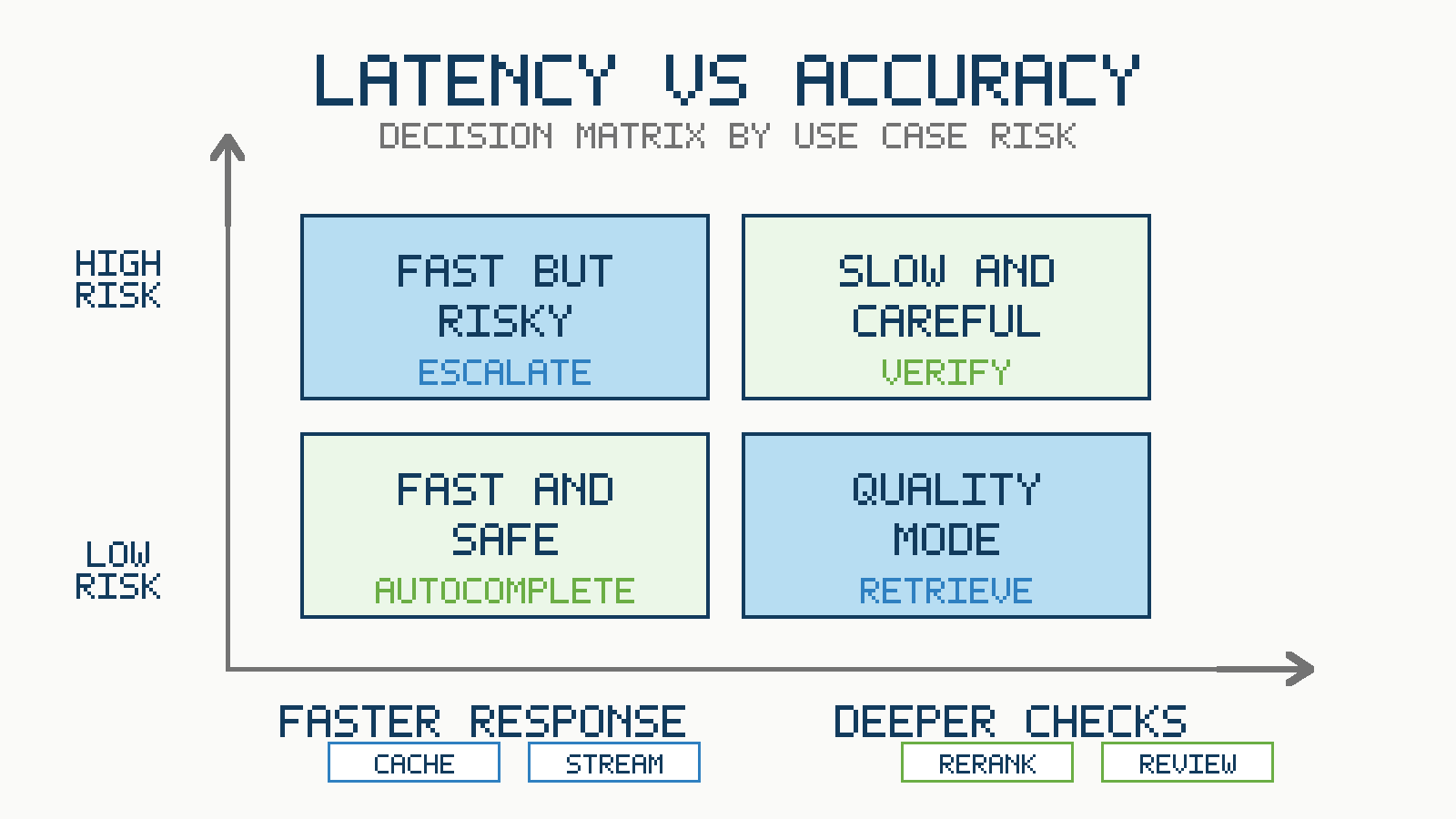
For each AI workflow, define four operating modes.
Use an instant mode for low-risk, high-frequency interactions such as suggestions, formatting, and simple classification. Optimize for time to first useful output. Accept that the answer may be lightweight.
Use a standard mode for common questions where retrieval is needed but risk is moderate. Optimize for a balanced experience with source grounding, reasonable latency, and useful fallbacks.
Use a deep mode for high-risk, complex, or account-specific questions. Allow more latency for stronger retrieval, tool calls, reranking, validation, citations, and review.
Use an escalation mode when the system lacks confidence, lacks permission, detects policy risk, or cannot retrieve enough evidence. Escalation can mean asking a clarifying question, handing off to a human, or producing a limited answer with explicit uncertainty.
The product should route between these modes dynamically. The same user may need a fast answer for a simple navigation question and a careful answer for a billing dispute. The same system can be both fast and accurate when it is allowed to choose the right path.
Conclusion
Latency vs accuracy is not a one-time model choice. It is an operating discipline for AI products. Start by understanding the user moment and the cost of being wrong. Use fast paths where mistakes are recoverable and deep paths where evidence matters. Measure latency distributions, not just averages. Measure quality by task outcome, not generic benchmark scores. Build fallbacks for cases where the system cannot be both fast and confident.
The best AI systems do not blindly optimize for the fastest response or the most expensive answer. They make the tradeoff visible, intentional, and appropriate to the task. That is how AI products become not only impressive in demos, but reliable in real workflows.